
Chart Geany5.2.9 - Download
You'll be able to download in few seconds.
Publisher Description
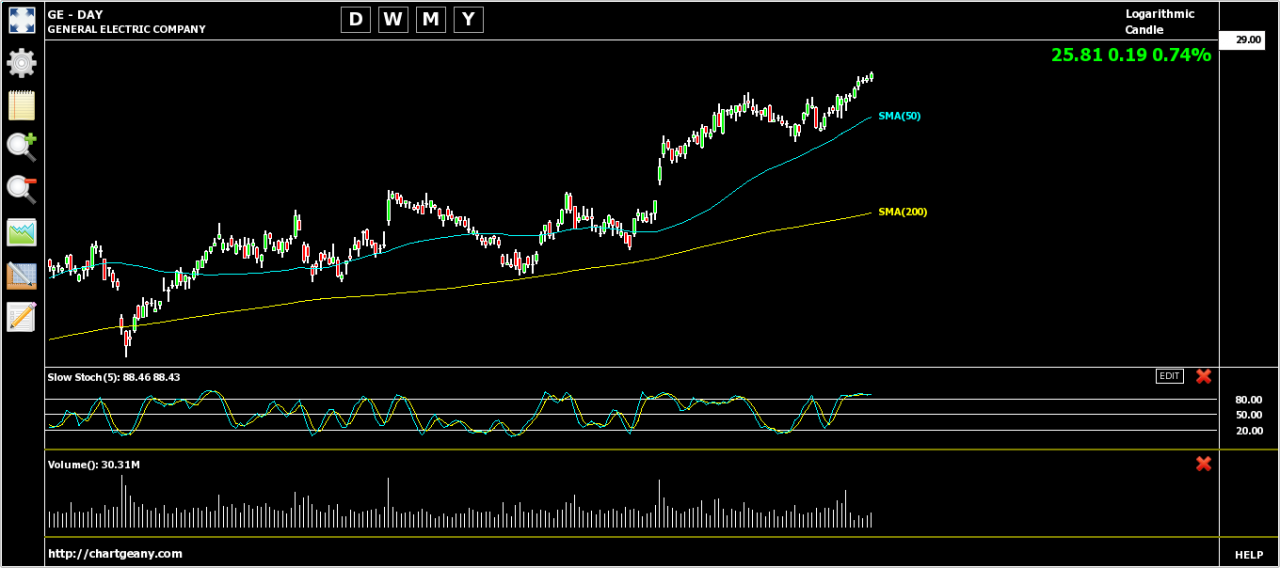
Chart Geany is a cross platform software solution for market technical analysis and charting. Novice and experienced investors will find a fast and easy tool to analyze stocks and other financial instruments on their desktop, and take the right decisions. Compatible with stocks, mutual funds, futures, indices. Major technical analysis indicators: Simple Moving Average, Exponential Moving Average, MACD, Fast and Slow Stochastics, Money Flow Index, Rate of Change, Relative Strength Index, Williams R, Bollinger Bands, Parabolic SAR and Average Directional Index. Tab-based graphical user interface. You can manage the opened charts the same way you manage the open pages of your web browser. Drawing and text objects: Labels, Trailing Text (a label attached to specific date), Horizontal Lines, Vertical Lines, Trend Lines and Fibonacci Retracements Line, Bar, Candle and Trend Candle (Heikin-Ashi) charts. Linear or semi-logarithmic price scaling. Zoom In and Zoom out. Time-frames: Day, Week, Month and Year. Comma Separated Values (CSV) files can be imported through the CSV Manager. Most common formats are supported like Metastock 7, Metastock 8 and AMI Broker. Easy download of quotes from Yahoo Finance or Google Finance. One click screen shots for charts. Spreadsheet-like data manager. Single file local storage. You can work offline if needed.
About Chart Geany
This Investment Tools program is available in English. It was last updated on 29 September, 2026. Chart Geany is compatible with the following operating systems: Windows.
The company that develops Chart Geany is Chart Geany. The latest version released by its developer is 5.2.9.
The download we have available for Chart Geany has a file size of 40.9 MB. Just click the green Download button above to start the downloading process. The program is listed on our website since 2018-04-09 and was downloaded 0 times. We have already checked if the download link is safe, however for your own protection we recommend that you scan the downloaded software with your antivirus. Your antivirus may detect the Chart Geany as malware if the download link is broken.
How to install Chart Geany on your Windows device:
- Click on the Download button on our website. This will start the download from the website of the developer.
- Once the Chart Geany is downloaded click on it to start the setup process (assuming you are on a desktop computer).
- When the installation is finished you should be able to see and run the program.
Program Details
System requirements
Download information
Pricing
Version History
version 5.2.9
posted on 2018-04-09
Disclaimer
External Download
We do not host Chart Geany on our servers. We did not scan it for viruses, adware, spyware or other type of malware. This app is hosted by the software publisher and passed their terms and conditions to be listed there. We recommend caution when installing it.
The external download link for Chart Geany is provided to you by apps112.com without any warranties, representations or guarantees of any kind, so access it at your own risk.
If you have questions regarding this particular app contact the publisher directly. For questions about the functionalities of apps112.com contact us.
